🔥 TRENDING · Video Prompts
ROMANTIC 2D ANIMATION | CINEMATIC VIDEO PROMPTS
Prompt
🌙❤️ A GLANCE THAT SPEAKS — ROMANTIC 2D ANIMATION | CINEMATIC BEAUTY SHOTS | 10 SECONDS | 16:9
GOOGLE FLOW VIDEO PROMPT
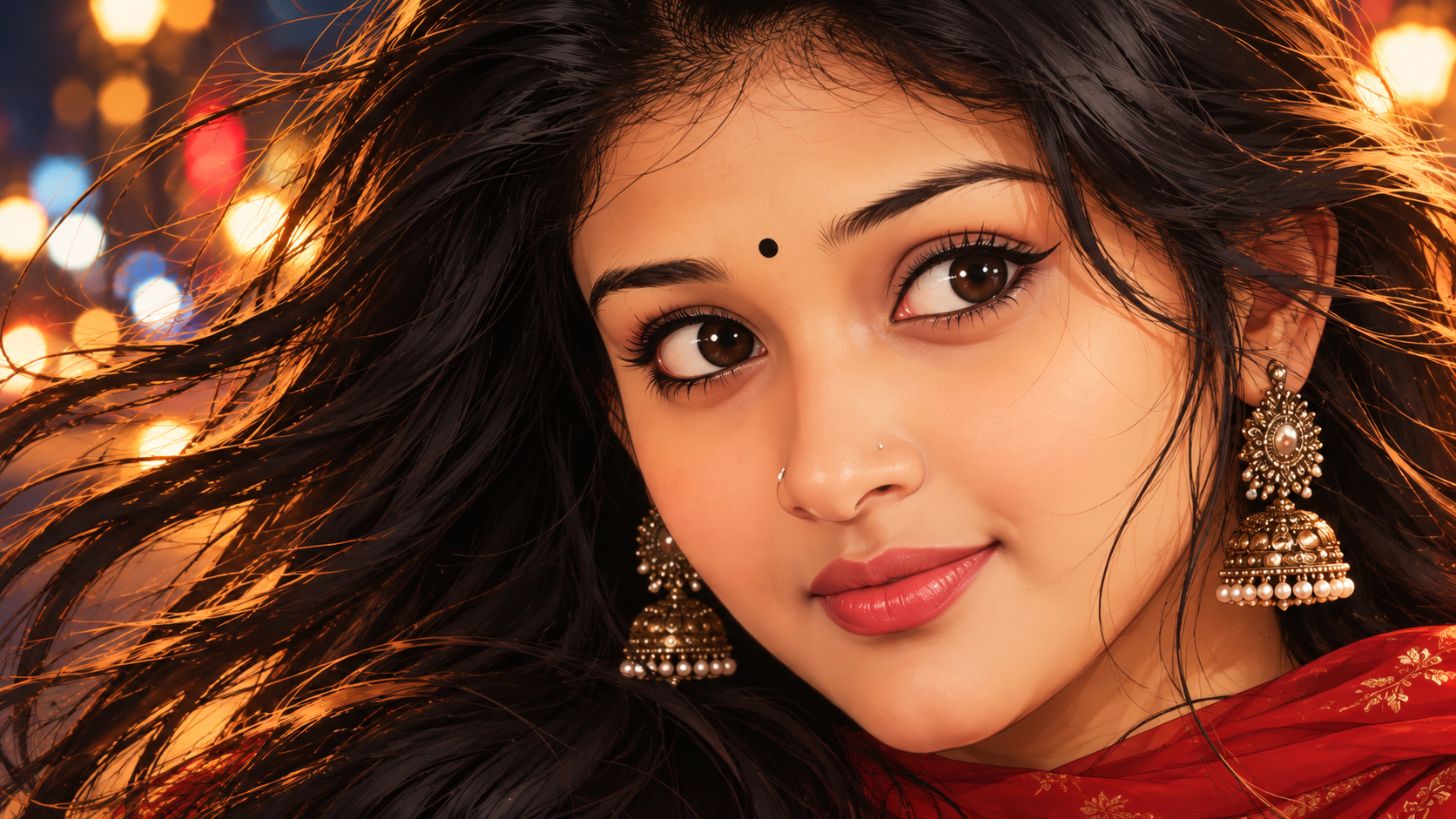
Animate the uploaded 2D digital illustration into a breathtaking, romantic, cinematic anime-inspired animation. Preserve the exact original girl's facial identity, illustrated facial proportions, beautiful brown eyes, eyelashes, tiny bindi, nose, lips, long flowing black hair, golden earrings, red traditional outfit, and artistic illustration style.
ABSOLUTE REQUIREMENT: Pure 2D digital illustration animation. Maintain the original hand-drawn, semi-realistic anime/vector artwork throughout. No photorealism, no live-action, no 3D rendering.
SHOT 1 — MESMERIZING EYES (0–3 SECONDS)
Begin with an extreme cinematic macro close-up of her beautiful expressive brown eyes.
Her eyes are initially open, gazing softly and romantically toward the viewer. Slowly, her upper eyelids descend as she gently closes both eyes. Hold the closed-eye expression for a brief, peaceful moment, then slowly reopen them.
Show delicate eyelashes moving naturally, beautiful reflections of golden city lights inside her pupils, and subtle highlights around her eyelids.
A few fine black hair strands gently float near the outer corners of her eyes.
Camera: Extremely tight eye close-up with a slow, elegant cinematic movement.
SHOT 2 — BEAUTIFUL SMILING LIPS (3–6 SECONDS)
Create a seamless cinematic transition to an extreme close-up of her nose, cheeks, and beautiful coral-pink lips.
Her lips begin with a relaxed, neutral expression and gradually form a tiny, charming, closed-mouth smile. The smile should develop slowly and naturally, creating a sweet, romantic feeling.
Show delicate illustrated shading around her lips, soft rosy cheeks, and subtle warm highlights on her skin.
A few loose strands of hair gently move across the edge of the frame. Keep the lips natural and elegant. No speaking, no lip-sync, no visible teeth.
Camera: A gentle cinematic push-in focused on her lips and smile.
SHOT 3 — DREAMY FULL-FACE PORTRAIT (6–10 SECONDS)
Transition into a beautiful, extremely close frontal portrait showing her entire face, eyes, nose, lips, chin, and flowing hair.
She looks directly into the viewer's eyes with a sweet, affectionate expression and a delicate closed-mouth smile.
She gives one final gentle blink, then opens her eyes and holds a captivating romantic gaze.
Her long black hair flows gracefully in a gentle nighttime breeze. A few fine strands fall beautifully across her forehead and cheek, moving naturally with the wind.
Her golden jhumka earrings sway slightly. Warm golden highlights shimmer across her hair.
The dreamy nighttime street background glows with soft amber, golden, blue, and red bokeh lights.
Camera: Slowly pulls back just enough to reveal her complete face while maintaining an intimate close-up composition.
CINEMATIC VISUAL STYLE
Premium semi-realistic 2D anime-inspired digital illustration animation. Beautiful hand-drawn details, smooth illustrated shading, expressive eyes, delicate eyelashes, elegant facial expressions, flowing hair animation, warm cinematic lighting, glowing bokeh, sophisticated color grading, and fluid frame-to-frame animation.
MOTION & CONSISTENCY RULES
- Preserve the exact same character identity across all three shots.
- Maintain consistent eye shape, nose, lips, skin tone, and facial proportions.
- Use smooth cinematic transitions between shots.
- Make eye movements slow, delicate, and natural.
- Make her smile subtle, sweet, and closed-mouth.
- Keep hair movement soft and graceful.
- Maintain the original 2D illustration appearance in every frame.
- No unnecessary head movement or exaggerated expressions.
NEGATIVE PROMPT
Photorealism, real human footage, 3D CGI, face morphing, changing identity, distorted eyes, asymmetrical blinking, exaggerated eyelashes, unnatural lips, open mouth, visible teeth, talking, lip-sync, exaggerated smile, aggressive wind, chaotic hair movement, changing costume, flickering outlines, unstable facial features, sudden transitions, camera shake, text, watermark, logo.
OUTPUT SETTINGS:
- Duration: 10 seconds
- Aspect ratio: 16:9
- Animation: Pure 2D digital illustration
- Shot sequence: Eyes close-up → Lips close-up → Full-face close-up
- Camera: Cinematic macro shots and smooth transitions
- Mood: Romantic, dreamy, elegant, emotional
- Audio: No dialogue; optional soft romantic instrumental music.
FINAL INSTRUCTION: Make this feel like a premium romantic anime film sequence, where the girl's eyes tell a story, her gentle smile creates emotion, and her final direct gaze leaves a beautiful lasting impression. Every shot must be visually stunning, smooth, delicate, and artistically consistent.